TELEGRAM CHANNEL – HOW TO USE IT TO MAKE MORE MONEY
How to Put a Pinned Post on Your TG Channel to Promote Your Web Cam Rooms

Turn your Telegram Channel into a simple traffic and income tool that helps subscribers find your rooms — and can potentially generate referral income from new users.
YOUR TELEGRAM TRAFFIC FLOW
Telegram Subscriber → Pinned Post → Your Cam Rooms
PLUS: POTENTIAL REFERRAL INCOME
New Viewers → Via Your Affiliate Link → Create New Platform Account → Your Cam Room
Where your room platform has an affiliate or referral program permits it, an eligible new user account registration may also generate referral income for you.
What you’ll have when you’re finished
One permanent “Watch Me Live” post pinned to your Telegram Channel, containing tested links to your active cam rooms and approved affiliate/referral links where appropriate.
EXAMPLE
What Your Finished Pinned Post Can Look Like
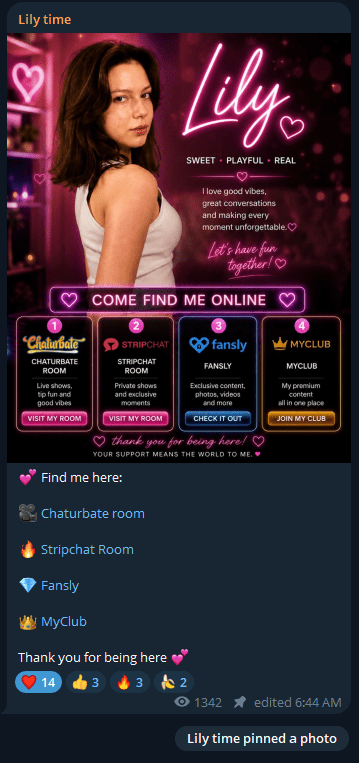
Here is an example of a model using one pinned Telegram post as a permanent “Find Me Online” directory.
WHAT MAKES THIS WORK
✓ One permanent “Find Me Online” post
✓ Cam-room links are easy to find
✓ Each destination has a clear label
✓ Subscribers can choose where they want to watch or follow
✓ The post can be edited when platforms or links change
Important: Your pinned post does not need to look exactly like this. A simple text post with clear, tested links can work just as well. The goal is to make it easy for subscribers to find you.
STEP 1
Decide What You Want to Promote
Your pinned Telegram Channel post should give subscribers one easy place to find your web cam rooms and other destinations you want them to visit. Start with the links that matter most to your income. You don’t need to include every account you have — only the places you actually want your audience to use.
STEP 2
Find Your Rooms Affiliate/Referral Links
Before copying the normal web address for each of your cam rooms, check whether the platform provides an affiliate or referral link that takes people directly to your room.
These links can work just like a normal room link for your Telegram Channel subscriber — they click it and arrive at your room. But the affiliate tracking can also mean that if an eligible new visitor goes on to register, you may receive referral income under that platform’s program.
That means the same pinned post can do two jobs: send existing viewers back to your room and potentially earn referral income from users that create a new account.
1 — FIND
Find your affiliate/referral section and generate your tracked room link.
2 — CHECK
Make sure the link opens your actual cam room, not just the platform homepage.
3 — TEST
Open the link yourself and confirm that it reaches the your room and retains the expected tracking.
Important: Affiliate programs, commission structures and eligibility rules can change. Check the current rules for each platform before publishing your links.
STEP 3
Build Your “Find Me Online” Post in TG
Your post doesn’t need to be complicated. Give it a clear heading, briefly tell subscribers what they’ll find there, and then list each destination separately. See the example above (photo+links)
Make the destination obvious. A subscriber should know what will happen before they click each link.
STEP 4
Add an Image
A visual can make your pinned post easier to notice and feel more like a permanent part of your channel. (see example above)
You could use a simple branded graphic with:
FIND ME ONLINE
WATCH • FOLLOW • JOIN
or use a suitable photo of yourself with the same message.
Keep the graphic simple. Its job is to attract attention — the clickable links belong in the Telegram post itself.
STEP 5
Test Every Link
Before you pin the post, click every link.
Check that:
✓ It opens the correct platform
✓ It goes to your correct room or page
✓ Your room name is correct
✓ Your affiliate/referral tracking is present where applicable
✓ The link works properly on mobile
For affiliate room links in particular, confirm that the link takes the visitor to your room, not simply to the cam site’s homepage.
STEP 6
Publish and Pin the Post
Once everything is correct, publish the post to your Telegram channel. Then pin it so that new and existing subscribers can easily find it.
The exact Telegram interface can change, but the objective is simple:
Publish → Pin → Keep it accessible
Your pinned post now becomes a permanent directory for your audience so that when you post a pre streaming message your subscribers can click straight into your room/s.
STEP 7
Keep Your Pinned Post Updated
Remember to Update this whenever you:
✓ Start streaming on another platform
✓ Stop using a cam site
✓ Change your username
✓ Get a better affiliate/referral link
✓ Launch a new fan club or paid-content page
✓ Change which platform you want to prioritise
The advantage of having one permanent Find Me Online post is that you can update the directory without changing your entire Telegram strategy.
Your Pinned Telegram Post Checklist:
✓ Create one Find Me Online post
✓ Add the cam rooms you actually use
✓ Use eligible affiliate/referral room links where appropriate
✓ Put your most important cam room first
✓ Clearly label every destination
✓ Add your fan club/content links where relevant
✓ Test every link
✓ Add a simple image if you want one
✓ Publish the post
✓ Pin it to your Telegram channel
✓ Update it whenever your links change